macOS Tahoe forced me to abandon Music.app
I've been meaning to write this post for checks notes months but, life got in the way, you know how it is.
Those who know me know that I listen to a lot of music, it's the one thing that has been consistent for...uh...most of my life at this point? I started maintaining a music library back when Windows Media Player on Windows XP was the shit, then like everyone else at the time, I found out about WinAmp. Then I started using iTunes, I think I used it before getting a 1st gen iPod Nano but frankly it has been so long I cannot remember exactly.

All that is to say, I've been collecting music files and organizing them through various means for a while. I endured through iTunes' idiosyncrasies for essentially most of my time with it, I put up with its weird quirks around music tag management. And I did the same when it transformed into Music.app on macOS.
At some point (circa 2015), I got fed up with having to re-tag stuff by hand and started using beets to manage and tag my music library. It clearly wasn't meant to be used in tandem with iTunes/Music.app but I made it work somewhat okay.
That lasted for a while, my library continued to grow, I briefly played around with mpd and ncmpcpp, but quickly went back to Music.app because I actually liked its UI a lot, despite it evolving sometimes for the worse.
Fast forward to last November when I finally decided to install macOS Tahoe on my main Mac. The upgrade was relatively painless despite... Liquid Glass being a thing. I don't hate Liquid Glass on iOS/iPadOS but it is clear it's half-assed on the Mac and this isn't a controversial opinion. But whatever, for better or worse, Apple's weird redesigns are fine, I got used to it relatively quickly.
Then I opened the Music app. After being, hum, startled by the UI and its...questionable decisions I went on to play some music and realized I had become Longtimeuser4 because Music.app broke the way I listen to music. You see, I am the type of sicko who has a lot of music1 AND who shuffles all of it...by album2, meaning when I press "play", Music.app would pick a random album to play, play it in order and then play another album.
Except Music.app on macOS Tahoe doesn't do that anymore. Actually, no, it does but much slower than it used to on macOS Sequoia. How slow? Unbearably slow if you have a lot of songs/albums. On my M1 Max Mac Studio, not a slow machine but somehow prepping the queue (~26,000 items, granted) takes upwards of four seconds and blocks the entire UI doing so, making the app feel unusable.
The same operation was instantaneous on macOS Sequoia. This was a clear regression and there wasn't much I could do about it. I also knew I wasn't the only one complaining about this, so it clearly wasn't just me!
Some quick troubleshooting showed that the time spent between clicking "play" and music playing was directly correlated to the size of the queue, meaning there's some O(N) type shit going on3. A friend of mine who happens to be close-ish to the matter helped me gather evidence that could help draft an internal bug report. I wasn't exactly confident this would get addressed quickly, if at all. I'll be frankly surprised if this gets fixed in macOS 27.
Exploring the alternatives
Keep in mind that my set of requirements for a possible solution were fairly picky, I wanted:
- Local music files.
- I was technically using Apple Music for Sync Library for easy sync between my machines and iDevices, but music streaming services are incomplete/underwhelming at best and complicit in war at worst.
- Album shuffling, or at the very least, a way to quickly pick albums at random.
- Scrobbling, I wasn't going to give up on 10+ years of listening data, damnit.
- At minimum, a macOS app and an iOS app that don't look like ass.
- And perhaps the most important: being able to handle a huge library without falling apart.
I had used Plexamp on iOS for a minute a few years prior and, while a Mac app does exist for it... it's essentially the iPhone app in a macOS window. I'm sure this works great if you have a few hundreds albums, but it very much doesn't if you have thousands. And it doesn't have album shuffling, and Plex is really not good at handling music files if you care about tagging. I assume Jellyfin would suffer from similar problems because it's not designed for music.
I had been a Doppler user on iOS for a while, and have tried the macOS version and... same deal, no album shuffling and no real solution for syncing either. Radiccio seemed like a promising new music player...until I tried it and it could not handle my library.
After many deliberations, I remembered I already host a bunch of stuff on my NAS/Home server so I figured I'd give Navidrome a try. Setting it up was fairly easy, I already had a copy of my music library (because of the previous Plex stint) so I just had to point it at the files and... it worked great.
Now, I needed clients. The "macOS native Navidrome/Subsonic clients" ecosystem is relatively dry at the moment. Amperfy came up a lot but it lacked my precious album shuffling, so it was a pass.
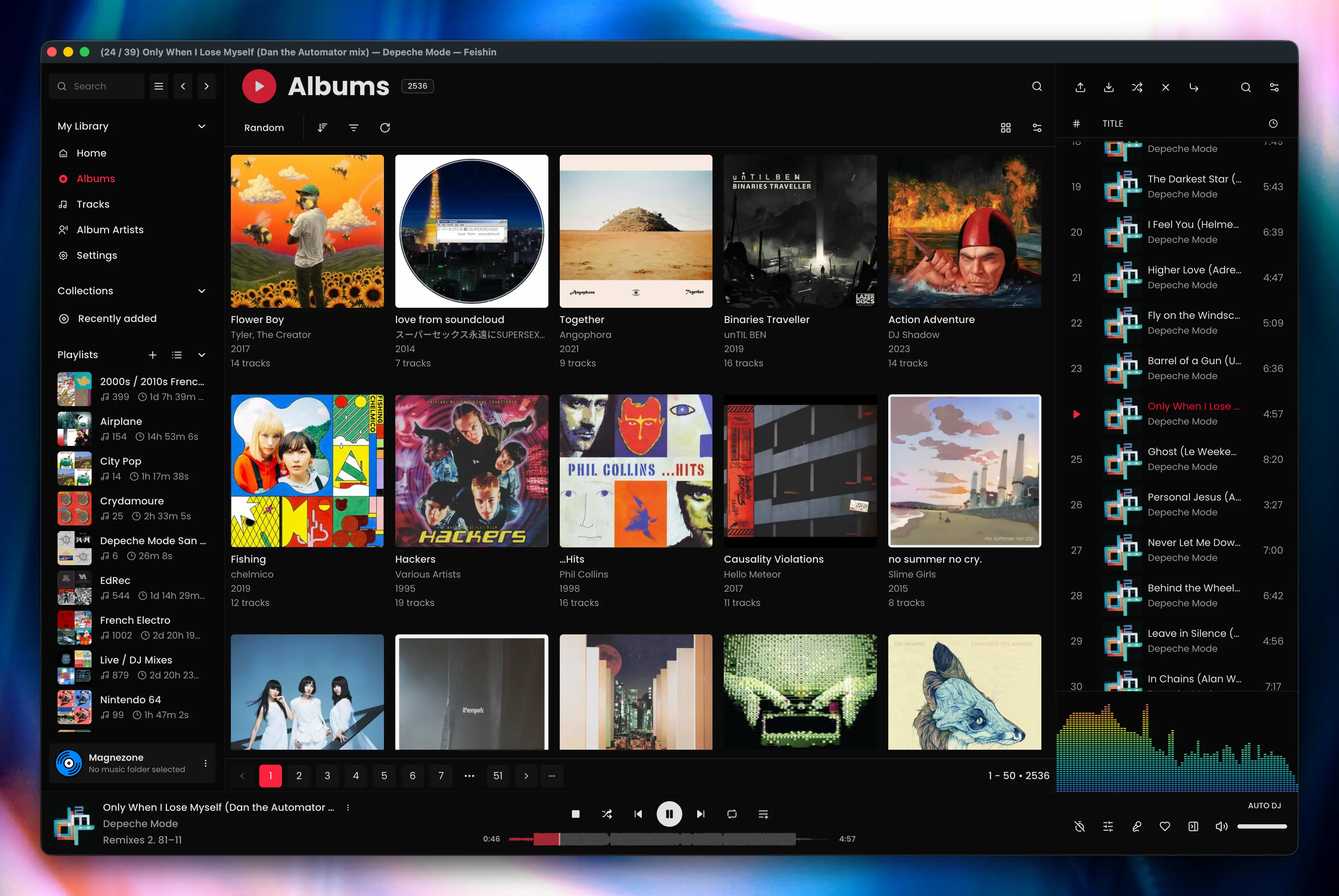
On the Mac, I ended up settling on Feishin. The Spotify-like UI definitely took some getting used to but it runs pretty well, the developer is fairly responsive/updates it regularly, and it's an Electron app meaning I can easily contribute fixes to bugs when I see them.
On iOS, Arpeggi has been my daily driver. It looks nice, fits pretty well on iOS, and the transcoding feature is very handy when on a cellular network4, I'll happily pay for it (even with a subscription) when it officially comes out (update May 2026) it's out now!
I am still managing files with beets on the NAS directly. I did create a new library from scratch to re-tag things properly. I eventually "upgraded" my whole library to FLAC files and took the time to match as many things on MusicBrainz as possible; this meant adding releases when they weren't already present. Yes, this took forever, but it makes me happy and I'll be able to sync changes from MusicBrainz, which is neat.
At this point, the workflow is pretty solid, I've been living like this for 4 months. I'm still sad about the state of software on macOS but I did gain something: control.
Neither Navidrome nor Feishin can modify my stuff, only I can, and if something blows up it's because I fucked up and not because of an obscure bug with Music.app.
And that control feels great nowadays.
Footnotes
-
~26,000 tracks across ~2,500 albums as of writing ↩
-
I know some people do it but shuffling individual songs sounds deranged and shuffling songs within an album ought to be a crime. ↩
-
See Big-O notation, essentially, the code is written in a way that the more items there are to process...the longer it takes to run. Which could be fine unless your code runs in a way that it taking more than a few miliseconds to run results in the app being unresponsive. ↩
-
On the advice of my friend Jae, I've set it up to transcode files to OPUS at 96kbps which is plenty when I'm on the go. ↩